Control your own data – Develop and share knowledge – Create your digital self
Control your own data – Develop and share knowledge – Create your digital self
Minimum Viable Product (MVP) thinking is common in product work. Start small. Ship fast. Learn. Improve. Used in the right way, this is useful.
But there is a downside.
When we think “MVP” all the time, it can spread to everything we do. It stops being a way to test ideas and becomes our main way of building. Then the focus often shifts from “What is a good solution?” to “What is the least we can do?”
This is the curse of MVP thinking.
It starts with good intent: build the smallest version that still works. But then it leaks into other areas. Internal tools. Design. Code. Team habits. We begin to ask the same question everywhere: “What is the minimum we can get away with?” And we stop asking: “What would be a good product here?” or “What is a solid solution to this problem?”
“Viable” slowly turns into “barely acceptable.”
The idea of MVP changes from “small but good” to “small and just enough.”
The result is often weak products. Features are shipped in a first, rough form and then left as they are. The “MVP” becomes the final version. The product turns into a mix of things that work, but not well. Users feel this. The product may do the job, but it does not feel like a good product.
The same thing happens in the experience. Flows work, but they are hard to use. The design looks and feels cheap or messy. The details are not cared for. People using the product can sense when the goal was “minimum” instead of “good.”
On the technical side, quick fixes become the norm. “We will clean this up later” is said often. But later never comes. Shortcuts stay. The system gets harder to change. Bugs appear more often. Simple changes take more time. The cost of “minimum” shows up over time.
This way of thinking also affects the team. Pride in good work can go down. Why polish something if “just enough” is always fine? People stop aiming high. They push for the fastest path, not the right path. Over time, “minimum” becomes the standard.
You can spot this curse in your own work by listening to how you and your team talk. Do you mostly ask “Is this shippable?” instead of “Is this good?” Are better ideas often stopped because “it’s too much”? Is feedback mostly about how fast and how small, not how good? If the word “minimum” shows up more than the word “good,” it is a warning sign.
The problem is not the idea of MVP itself. The problem is using MVP as a way to lower effort instead of a way to lower risk. MVP should be a tool, not a rule for all work. It should be a small start on the path to a better solution, not the end point.
A healthier way to use MVP is simple. Make sure “viable” still means “good enough to use with trust,” not “barely works.” Plan for at least one round of real improvement after you ship. Be clear when you decide, “Here we accept minimum,” and when you say, “Here we must build something good.”
The key is balance. It is fine to start small. It is good to learn early. But we should not let MVP thinking remove care, craft, and ambition. We should keep asking: “What is a good solution?” not only “What is the smallest solution?”
Use MVP as a tool to begin. Do not let it define how you do everything.
Not all mistakes are the same.
Sometimes a mistake only causes what it directly touches. You do something wrong. Something breaks. You fix it. The effect is mostly simple and clear. The result stays close to the original error. The damage is limited.
But the situation is very different when someone is actively looking for mistakes. Not just seeing errors by chance, but searching for them on purpose. Checking systems, steps, and rules to see where something is weak or unclear. And then looking for ways to use those weaknesses.
When a mistake is found by someone who wants to exploit it, the risk becomes much larger. The error is no longer just a small problem. It can become a way in. A tool to reach other things. A way to cause more trouble than the mistake alone would ever do.
The result is that the risk picture changes. The possible harm grows. The effects can spread. One mistake can lead to many new problems. It can move from one system to another. It can be used again and again.
In this kind of setting, the need for control becomes much more important. It is not enough to fix mistakes when we see them. We have to assume that someone may try to find them. And try to use them.
That means we need better checks. Clear rules. Regular review of the places where a mistake would matter most. We need to think not only “what does this break if it goes wrong?” but also “what could someone do with this if they wanted to exploit it?”
The key idea is simple: the same mistake has small impact when no one exploits it, and much bigger impact when someone does. Because of that, control and care matter more in situations where others have a reason to look for our errors.
There are two ways to think about things that are built.
One way is to ask: how was this built?
You look at the finished thing. You try to see how it works. How it is put together. Which parts and mechanisms it uses.
Often you start from the end and work backwards. You guess how it was made. You try to “reverse” it in your head.
This way of thinking is common. It is useful when you want to learn from a real thing. Or when you want to copy it. Or fix it.
The other way is to ask: how could I build something like this?
Here you do not care about building the exact same thing. You do not need to use the same steps or tools.
You look at what the thing does. What it achieves. What problem it solves.
Then you ask: how can I build something that does the same job?
How can I build my own version that reaches the same goal?
You think about your skills, your tools, your limits. You design your own way to reach the same result.
Both ways to think are useful. But often people use mostly the first one.
They focus hard on the actual thing in front of them. On the real app, the device, the system.
They try to learn every detail of how that one was built.
Then they try to follow the same path.
You can instead start from the goal.
Say you see a complex tool. You can ask how it was built. Look at the code. The parts. The design choices.
Or you can ask: what does this tool really do?
Maybe for you, a simpler tool that does most of the same job is enough.
You do not need the same structure. You just need the same effect.
A good way to work is to use both views.
First, understand how something is built, so you learn from it.
Then, switch and ask: given what I want to achieve, and what I have, how could I build something like this myself?
If you remember these two questions, you get more options:
You can learn from real things.
And you can still build your own way to reach the same outcome.
When we ask a language model to do a task, we often send one prompt and wait for one answer. Sometimes that is fine. But for harder work like coding, research, or long writing, this can fail or give random results.
A thought process generator is a way to improve this. Instead of going straight to the answer, we first define how the agent should think. We write down steps, order, checks, and what each step should produce. This turns a vague request into a clear plan.
A good way to define these plans is with a small domain specific language (DSL). The DSL is just a simple way to describe a thought process. For each process we list steps, inputs, outputs, and actions. For example, for a coding task, one process could be: first understand the problem, then plan a solution, then write the code, then check the code. The exact syntax is not important. What matters is that the plan is clear and easy to read and reuse.
For one task there can be many possible thought processes. The generator should be able to create different plans for the same task. These can vary in how many steps they have, how deep they go, and what kind of strategy they use. For a research task, one plan might start broad then go deep. Another might go deep into one source first. A third might write a rough draft first and then fill in gaps. The key idea is to have more than one way to think about the same problem.
Once we have several thought processes, we need to pick one. We can look at how clear each plan is. We can check if it covers all parts of the task. We can see if it is too long or too complex. We can check if it has steps for review and verification. Simple rules can help rank these plans. For example, for tricky tasks we can favor plans that include checks and self-review. For simple tasks we can favor short plans with fewer steps. Then we select the best one and use that to guide the agent.
After we choose a plan, the agent runs it step by step. The output of one step becomes the input to the next. If a step fails or finds missing info, the plan can say what to do: go back to an earlier step, ask the user for more details, or switch to a different path. We can log each step. This makes it easier to see what went wrong and to improve the plan later. It also makes the reasoning more visible and easier to trust.
To avoid designing every thought process from scratch, we can use patterns. A pattern is a common shape of thinking we use often. For example, a research pattern might be: collect sources, pull out key points, compare them, write a summary, then check. A problem solving pattern might be: clarify the problem, split it into smaller parts, solve each part, join the solutions, then review. A writing pattern might be: outline, draft, edit, polish. The generator can start from these patterns, then adjust them to fit the current task.
Many tasks have more than one “thought chain”. A thought chain is a line of thinking for one part of the job. For example, building a small feature might have a chain for understanding the need, a chain for designing the solution, a chain for coding, and a chain for review. Each chain can have its own thought process. The outputs of one chain feed into the next. The generator can create or reuse a process for each chain and link them.
Reuse is important. When a thought process works well for one task, we can save it and use it again on similar work. Over time we can build a small library of processes like “bug fixing”, “feature design”, “topic research”, “blog post writing”. When a new task comes in, we find a close match and adapt that process instead of starting from zero. We can remove or add steps and tune the level of detail. This is similar to how people develop mental workflows and reuse them.
A useful way to think about all this is to compare it to a database execution plan. When you send a query to a database, it does not run it directly. It first creates several possible ways to run the query. It estimates which way is best. Then it picks one plan and executes it. We can do the same with thought processes. The user’s task is like the query. The different thought processes are like different execution plans. The choice of plan is based on simple rules. The final result comes from running that plan step by step.
This kind of thought process generator can help make language model agents more stable and clear. It gives structure to tasks. It lets us see and change how the agent thinks. It allows reuse of good plans from past work. A simple next step is to sketch a small DSL for thought processes in your own domain. Then list a few patterns you use often. Finally, try having an agent generate, rate, and run these processes on real tasks, and refine them over time.
Language model–based agents are increasingly used to not just generate text, but to take actions: call APIs, run commands, read and write files, and update databases. Many setups today assume that if an agent has a capability wired in, it is allowed to use it. The default behavior is often to perform actions whenever the agent decides they’re helpful.
These actions can be simple, like fetching something from an external URL, or more impactful, like running commands locally on a machine or updating files and databases. From a usability perspective this can look appealing: you ask for something, and the agent goes ahead and does it. But this action-first default hides important risks and makes systems harder to control.
A safer baseline is that the default agent behavior should be: perform no actions. An agent should start in a mode where it can read, reason, and suggest, but not execute anything that changes the outside world. Any action it is allowed to take should be explicitly configured and explicitly permitted.
In practice, this means that which actions can be executed must be set up deliberately. Tool use, external calls, command execution, and write access should all be treated as opt-in capabilities. If a system wants an agent to be able to fetch a URL, run a specific command, or update a certain database, that must be granted explicitly, not assumed because the agent technically can do it.
This follows a zero trust mindset for agents. Do not assume an agent is allowed to act just because it has access to a tool. Assume no action is allowed by default, and then selectively enable narrowly scoped capabilities with clear permissions and boundaries. This makes it easier to reason about what an agent can do, reduces the risk of unintended changes, and keeps control in the hands of the people designing and operating these systems.
When you build agents with language models, it’s very tempting to go straight for the most powerful models. These are usually delivered by the biggest providers, running in their data centers, with impressive capabilities and benchmarks. That can be a great choice for experimentation and early prototypes, where you want to see what is possible as quickly as you can.
But when you want agents to automate work at industrial scale, as part of important processes, the priorities start to shift. Having the newest and “best” model is not necessarily the most important thing anymore. Instead, stability and predictability become more critical.
In many settings, it matters that the result is always the same. If the agent is part of a core workflow, even small inaccuracies can become a real cost. Service interruptions or changes in behavior can cause delays, errors, or force people to step in manually. When that happens in an industrial context, it is not just an inconvenience; it is a business problem.
Using powerful models from large providers also means tying yourself to a service you don’t control. The provider can update or change the model at any time. The same prompt might suddenly produce a different result because the model was upgraded. That might be fine in a demo, but it is risky in a production process that depends on consistent behavior over time.
In these situations, self-hosted or more tightly controlled models can be a better alternative. With your own infrastructure, or with providers that prioritize stability, nothing changes without testing and approval. You decide when to update a model, you can verify the impact of changes before they reach production, and you can roll back if something breaks. The focus is on predictable behavior rather than constant evolution.
This leaves you with a clear strategic choice. You can use the most powerful and newest models and accept that the service can suddenly change in production. Or you can go for stability and predictability by using other types of providers or self-hosted solutions, where you control when and how things change.
For agents that are part of critical, industrial-scale processes, the question is less “What is the most powerful model available?” and more “What behavior can I rely on, day after day, without surprises?”
In many organizations that adopt agents and language models, a clear pattern appears: about 1% of users consume roughly 90% of the resources. A few people run most of the prompts, build most of the automations, and drive most of the costs. Yet these resources are often not used well—they don’t generate new value or new “resources” for the organization.
This is the usage pattern many companies see with agents and language models. A small number of users use them very heavily. It costs a lot. And there is no obvious, measurable benefit. You get bills and usage graphs, but not clear gains in efficiency, revenue, or quality.
So what are these heavy users actually doing? Are they very inefficient? Are they creating large amounts of unnecessary automation? Are they mostly testing and experimenting? Or are they simply wasting resources? In many cases they are building and trying things without clear goals or success criteria. They create workflows that nobody else adopts, or they use agents as personal helpers without turning that into shared improvements for their team.
When heavy usage doesn’t create new value, the organization ends up funding exploration without getting much back. The agents and language models are used a lot, but not in ways that change core processes or free up time. Experiments remain experiments, and the rest of the organization barely notices.
A useful way to test this is to ask: what happens when these heavy users stop using agents? If that 1% stopped tomorrow, would the need for resources fall sharply? Would the organization’s demand for agents almost disappear? If so, it suggests that most usage was driven by a few enthusiasts, not by broad, sustainable use cases. The tools were not embedded deeply into everyday work.
To understand if you have this problem, look at how usage and costs are distributed. Identify who the heavy users are and what they use agents for. Check whether their work leads to concrete outcomes, such as time saved, fewer manual tasks, or improved key metrics. Ask how much of their activity becomes shared, production-ready workflows, and how much stays as personal experiments.
Heavy users can be valuable—they are often the ones who explore possibilities and build first versions. But their energy needs direction. Instead of open-ended usage with no clear benefit, their work should be tied to specific problems and processes. Experiments should either be turned into stable solutions or consciously stopped. Otherwise, the organization risks a situation where 1% of users burn 90% of the budget, without creating new value in return.
The goal is not to shut down these users, but to make sure their efforts generate real, lasting benefits. When agents and language models are used in ways that create new resources—saved time, better decisions, improved workflows—the high consumption can be justified. When they are not, it is a sign that usage needs to be aligned more closely with the organization’s actual needs.
In many situations there are more wrong choices than right ones. That means it’s easier to choose wrong, easier to make mistakes, and easier for things to go wrong. This can feel frustrating, but it also creates an opportunity: even if you are not good at choosing the right option immediately, you can still make progress by learning which options are wrong and eliminating them over time.
When the number of wrong options is large, mistakes become a natural part of how you learn. Every wrong choice shows you something: this does not work, this does not fit, this is not the right path. Step by step, you build knowledge around what is a bad choice, even before you fully know what the right choice is.
You don’t need to be good at choosing correctly from the beginning. You can start with a set of possible options, try them in small ways, and pay attention to what clearly doesn’t work. Each time you recognize a wrong choice, you can remove it from your list. By gradually eliminating wrong choices, you reduce the chance of making the same mistake again.
Over time, the number of bad options shrinks. That alone makes it more likely that you will end up making better decisions. You are not suddenly perfect at choosing; you have simply removed many of the ways to choose badly. In a world with more wrong choices than right ones, this is a practical way to move forward: treat wrong choices as information, use them to narrow the field, and let the space of possible mistakes become smaller and smaller.
When people start with automation, they often pick the most complex or “interesting” parts of their work. That can feel appealing, but it rarely gives the best return. A more practical approach is to first automate the parts of a process that repeat often and need to be done many times.
You should look for tasks that come up again and again. These are the actions you perform every day or several times a week. They are usually predictable, a bit boring, and you can almost do them on autopilot. Even if each instance is quick, the total time spent adds up.
On the other hand, you can wait before you automate tasks that are quite static and done rarely. These are things you set up once and then hardly touch. They might be important, but because they do not repeat much, you will not gain that much by automating them first.
A simple example is a testing workflow in software development. One part is writing the code for a test. Another part is evaluating the result of a test run. Writing the test code typically happens once per test and is updated infrequently. Evaluating the test result happens every time the test runs.
From a practical point of view, it makes more sense to first automate the evaluation of test results, because it is repeated many times. Automating the creation of test code can still be useful, but since it is done once and updated rarely, it is usually a weaker candidate for your very first automation efforts.
So, when you decide what to automate, start by asking: what do I do most often, and what follows clear, repeatable steps? Automate those parts first, and postpone the work that is static, infrequent, and more one-off in nature
Software engineering has evolved rapidly over the last decade. We have excellent tools for writing code, managing source control, tracking issues, deploying software, and monitoring production. Yet the engineering process itself remains fragmented across dozens of disconnected applications and manual handoffs.
At the same time, AI has introduced a new opportunity. Specialized agents can assist engineers throughout the software lifecycle—not only by writing code, but by helping define requirements, design solutions, review changes, generate tests, automate releases, and monitor production systems.
DevBench brings these ideas together.
DevBench is a software engineering workbench that supports the complete lifecycle of software development:
Rather than treating these as isolated activities, DevBench connects them into a continuous engineering process.
The illustration below shows the concept. The software engineering lifecycle forms the outer cycle. At the center is DevBench, providing a unified workspace for projects, documentation, code, and automation. Surrounding the workbench are specialized engineering agents, each supporting a particular stage of the process.
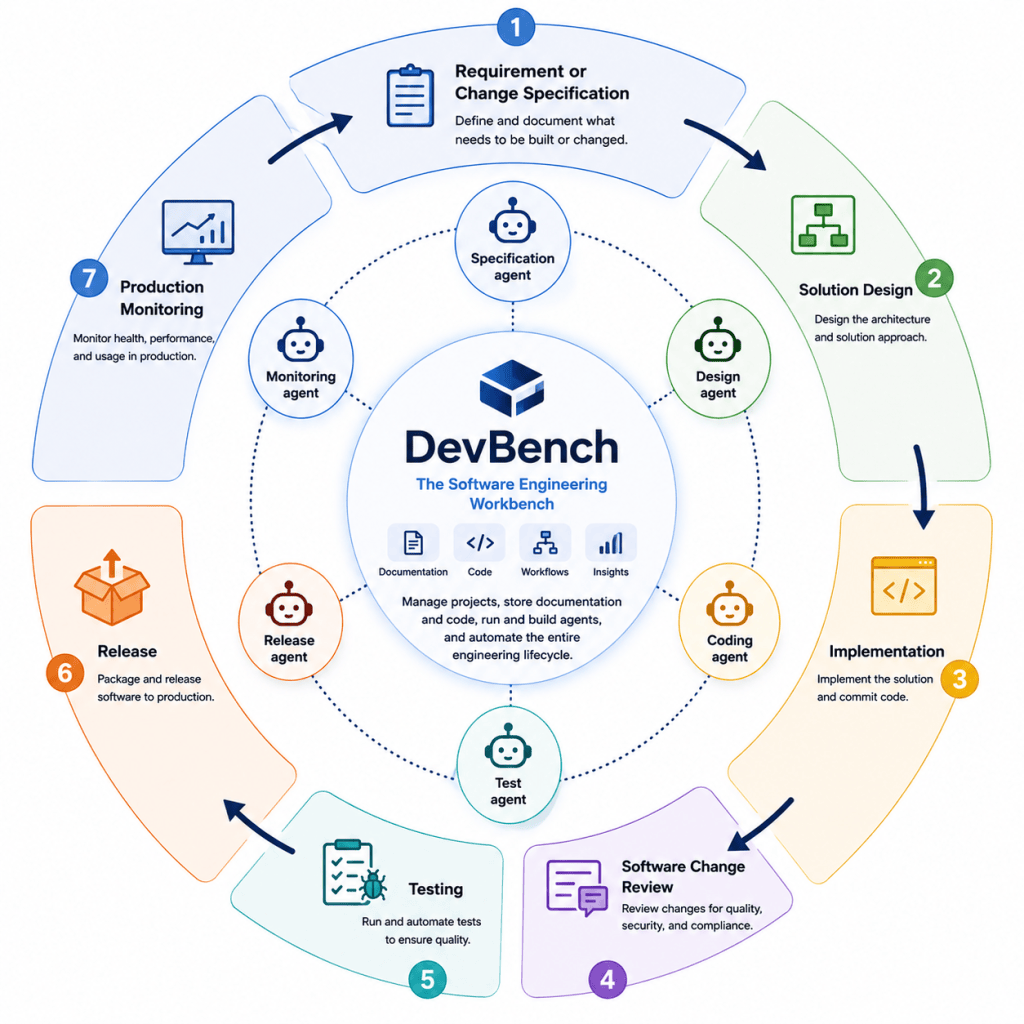
Illustration: DevBench orchestrates the complete software engineering lifecycle with specialized engineering agents.
DevBench is not another coding assistant.
Instead, it is a platform where organizations can build, customize, and orchestrate engineering agents that work alongside development teams. Each agent has a well-defined responsibility, from refining requirements to reviewing pull requests or monitoring production systems.
Engineers remain in control. The agents automate repetitive work, provide recommendations, maintain consistency, and ensure traceability across the entire lifecycle.
Beyond supporting the process, DevBench provides the foundation for modern software engineering teams:
Software engineering is becoming increasingly collaborative—not only between people, but between people and intelligent tools.
Our vision for DevBench is simple:
Create a single workbench where software is engineered from idea to production, with specialized agents supporting every step of the journey.

